What is LeadFinderPro?
LeadFinderPro is a Windows desktop application that helps you research local businesses using the official Google Places API — the same source behind Google Maps. Search by keyword, location and radius, then export the results to CSV or Excel in seconds. No scraping, no databases, just clean data on demand.
Built for Agencies
Perfect for marketing agencies, SEO specialists, web designers and freelancers looking to grow their client base.
Local Search, Global Reach
Search any city or region worldwide and instantly find active, verified businesses with contact details.
Export‑Ready Data
Export to CSV or Excel for market research, CRM imports, or your own sales outreach — no extra steps needed.
How LeadFinderPro Works
From installation to your first export in under 15 minutes.
Install LeadFinderPro on Windows
Download and run the installer on your Windows PC. Setup takes less than a minute.
C:\LeadFinderPro instead.
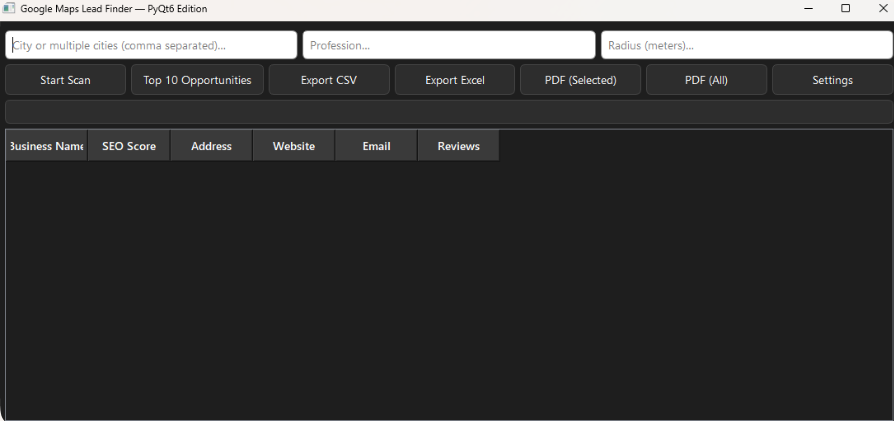
Enter Your Google API Key
Setup takes 5–10 minutes. See the full guide below for a step-by-step walkthrough.
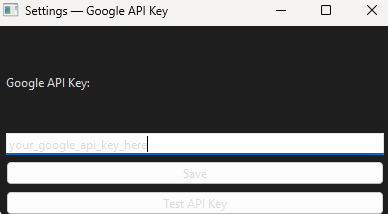
Search by Keyword + Location
Enter a niche and location — for example "Dentist in Amsterdam, 10 km radius" — and LeadFinderPro fetches matching businesses instantly.
Export Your Results
Download your results as a CSV or Excel file. Use them for market research, competitor mapping, CRM enrichment, or your own outreach.
Watch the Demo
See LeadFinderPro go from API key setup to exported leads in about 30 seconds.
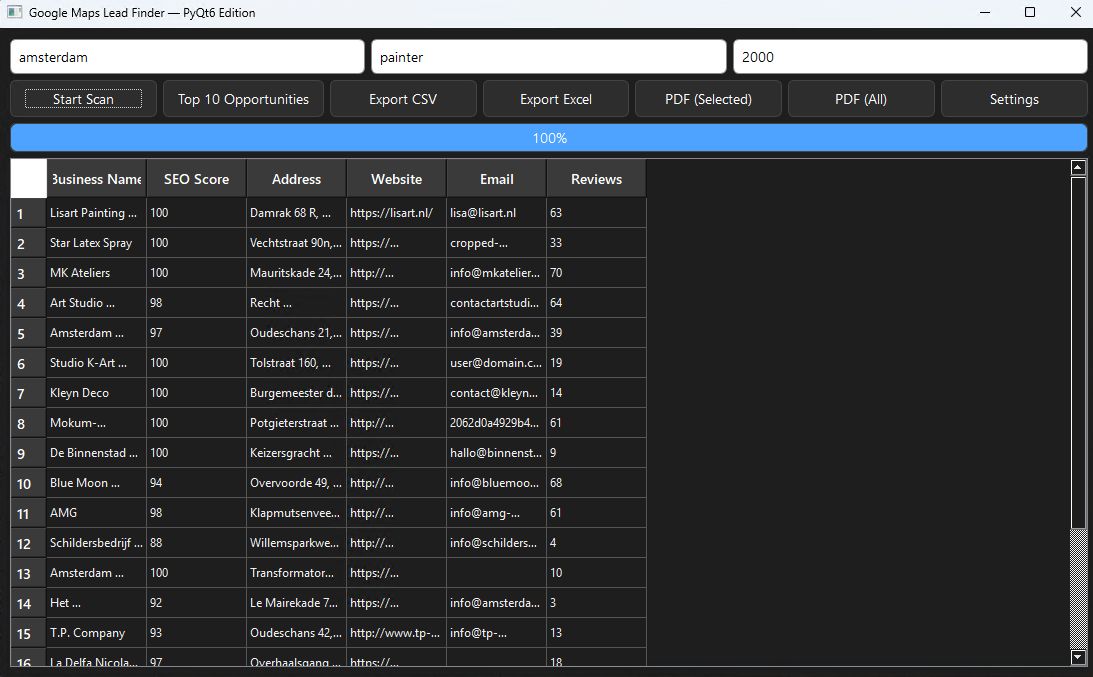
See LeadFinderPro in Action
A quick visual overview of the app — from setup to search results.
How to Get Your Google API Key
LeadFinderPro uses the official Google Places API. You'll need a free Google Cloud account to get started.
Google charges for API usage. Costs depend on how many searches you perform. Most users spend between $1 and $10 per month, but heavy usage can cost more. Google offers a $200 free monthly credit which covers most casual users entirely.
Need a detailed walkthrough? Click here for the full Google API setup guide →
Frequently Asked Questions
Everything you need to know before buying.
Does LeadFinderPro work outside the US?
Yes. LeadFinderPro uses Google Places data, which covers businesses worldwide. You can search any city or region globally — from Amsterdam to Sydney to São Paulo.
How much does the Google API cost?
Most users spend between $1 and $10 per month. Google charges per API request, so costs depend on how many searches you run. Google also provides a free $200 monthly credit, which is more than enough for most users.
Is this a one-time payment or a subscription?
LeadFinderPro is a one-time payment of $89 with lifetime access. No subscriptions, no recurring fees, no hidden costs.
What can I export from LeadFinderPro?
You can export your leads to CSV or Excel. Each export includes business name, address, phone number, website, and other available data from Google Places.
Does it work on Mac or Linux?
Currently LeadFinderPro is a Windows-only desktop application. Mac and Linux versions are not available at this time.
Pricing
One simple price. Lifetime access. No surprises.
LeadFinderPro
One-time payment – no subscription
- Full Windows desktop application
- Unlimited searches (Google API costs apply)
- Export to CSV & Excel
- Worldwide location search
- Instant download after purchase
- Lifetime access – no renewal needed
Questions before buying? Email us at support@leadfinderpro.net
Buy Now – $89